
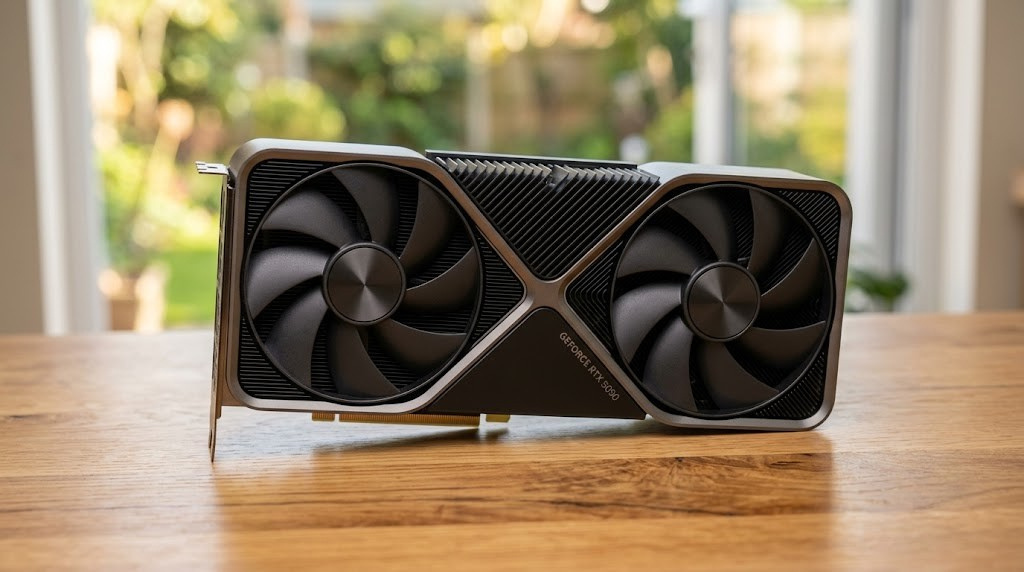
// 01 the pitchA relic from the future, and a $2,000 asterisk
Jensen Huang held it up on the CES stage the way he always does, like a relic pulled back from somewhere we have not arrived yet, and told a room of believers it would make everything else feel slow. Then came the line he could not resist, the one about how the more you buy, the more you save, delivered with the practiced smile of a man whose company spent the late nineties thirty days from collapse and now sits among the most valuable on earth. On paper the RTX 5090 lives up to the theatre. It is the fastest thing you can legally bolt into a desktop, and nothing from anyone else is close.
The asterisk arrived in the same breath. NVIDIA's headline claim, that the 5090 is twice the 4090, is true only inside the games and apps that support DLSS 4 and its new Multi Frame Generation, where three of every four frames you see are conjured by AI rather than rendered. Strip that away and the real, raw gap is smaller and far more honest. This review is about that honest number, measured twice. Once for the gamer who just wants frames, and once for the person quietly running language models on the machine under their desk, which is a very 2026 thing to be doing.
The short version: the 5090 is magnificent and slightly absurd. Whether that absurdity is aimed at you depends entirely on which hat you are wearing, and on what you already own.
// 02 the architectureWhat Blackwell actually changed
Generational GPU launches love big numbers, so it helps to know which ones matter. The 5090 is built on NVIDIA's Blackwell architecture, the GB202 die fabricated on TSMC's 4NP process, and it is genuinely large: 21,760 CUDA cores across 170 streaming multiprocessors, against the 4090's 16,384 cores and 128 multiprocessors. That is more of everything, and more is nice, but it is not where the interesting story sits.
The interesting story is memory. The 5090 pairs 32GB of new GDDR7 with a 512-bit bus, and the result is roughly 1.79 terabytes per second of bandwidth, against just over one terabyte per second on the 4090. That is close to an eighty percent jump, and it is the single spec that quietly decides most of this review. High-end gaming at 4K is hungry for bandwidth, and modern AI inference is hungrier still. NVIDIA also widened the L2 cache to 98MB from the 4090's 73MB, gave the card fifth-generation Tensor cores that can run FP4, a 4-bit number format the 4090 cannot touch, and the new fourth-generation RT cores that push ray tracing harder.
Two software-shaped things ride on that silicon. DLSS 4 brings a new transformer-based upscaling model that looks cleaner than what came before, and it brings Multi Frame Generation, a Blackwell-only trick that generates up to three extra frames for every one the GPU truly renders. That is the source of the doubled marketing figure, and we will treat it with the suspicion it deserves later. The honest baseline is the next number down.
| Specification | RTX 5090 | RTX 4090 | The delta |
|---|---|---|---|
| Architecture | Blackwell, GB202 | Ada Lovelace, AD102 | New generation |
| CUDA cores | 21,760 | 16,384 | +33% |
| Memory | 32GB GDDR7 | 24GB GDDR6X | +8GB, faster type |
| Memory bus | 512-bit | 384-bit | Wider |
| Bandwidth | ~1,792 GB/s | ~1,008 GB/s | +78% |
| L2 cache | 98 MB | 73 MB | +25 MB |
| Tensor cores | 680, 5th gen, FP4 | 512, 4th gen | FP4 support |
| Frame Generation | DLSS 4, Multi (up to 4x) | DLSS 3, single (2x) | Blackwell only |
| Board power | 575 W | 450 W | +125 W draw |
| Launch MSRP | $1,999 | $1,599 | +$400 |
// 03 the gamer's verdictHat one: the gamer chasing frames
Put a 5090 in a gaming rig and the first thing you notice is that it refuses to be the bottleneck. At native 4K it averages around thirty percent more frames than a 4090 across a wide spread of games, with the spread itself telling the real tale: some titles gain barely twenty percent, a few stretch past forty or even fifty. Turn on heavy ray tracing and the gap settles around twenty-seven to thirty-five percent. Turn on full path tracing, the most punishing lighting workload in games today, and the card stretches its legs: Cyberpunk 2077 in its Overdrive mode runs roughly thirty-eight percent faster than on a 4090, and Black Myth: Wukong lands near thirty-seven percent.
This is where the 5090 earns its keep as a gaming card. Native 4K path tracing has been a fantasy spec for years, the kind of thing that brought a 5080 to a slideshow around twenty frames a second without help. The 5090 is the first consumer card that makes it genuinely playable, and with the cleaner DLSS 4 upscaler doing the honest work of filling in resolution, it can hold a high refresh in the prettiest games ever shipped. If your dream is Cyberpunk's neon rain or Alan Wake 2's haunted forest at maximum fidelity on a 4K high-refresh panel, nothing else gets you there.
The Multi Frame Generation asterisk
Now the asterisk. NVIDIA's claim that the 5090 doubles the 4090 leans almost entirely on Multi Frame Generation, and it deserves a clear-eyed look rather than a cheer or a sneer. The technique works: a thirty to forty frame baseline can feel like a hundred plus, motion looks fluid, and in a slow, gorgeous single-player game it is a genuine pleasure. But generated frames are not the same currency as rendered ones. They add a little input latency, they can smear on fast motion, and crucially they do not help if your true frame rate is already low, because the engine still has to produce that one real frame before the AI can invent the next three. It is a smoothing layer, not a substitute for raw power, and reading a "2x" built on it as if it were rendered performance is exactly the kind of marketing multiplier this site refuses to take at face value.
So should a 4090 owner upgrade?
For pure gaming, the honest answer is no. A thirty percent average gain is the sort of jump you feel in benchmarks and rarely in your chair, and it shrinks fast as you step down from 4K. At 1440p the lead narrows to around twenty percent because the processor, not the graphics card, starts calling the shots, and at 1080p it nearly evaporates. Paying another two thousand or more, and feeding the thing 575 watts, for a margin you mostly see in a bar chart is a poor trade if you already own the previous champion. The 5090 is for someone building fresh, someone coming from a 3080 or 3090 or an older mid-range card, or someone whose specific obsession is native 4K path tracing at high refresh. If that last sentence is not you, your 4090 is fine and will stay fine for a while.
One more thing the gamer should keep in the corner of their eye: the future. The Witcher 4 is being built on Unreal Engine 5 with Lumen, Nanite and ray tracing running at once, and Grand Theft Auto VI arrives on consoles in November 2026 with a PC port expected to follow roughly a year later. When those land, native 4K at maximum settings will get heavy again, and the 5090 is the card best placed to swallow them. That is a reason to buy if you are starting from scratch. It is not, on its own, a reason to throw out a perfectly good 4090 today.
// 04 the AI verdictHat two: the AI tinkerer at the desk
Switch hats. The most interesting thing happening to the 5090 has little to do with games. A growing crowd of developers, researchers and hobbyists run large language models locally, for privacy, for cost, for the simple pleasure of owning the whole stack, and for that crowd the 5090 reads very differently. Here the headline spec is not the core count, it is that eighty percent more memory bandwidth, because token generation is bound by how fast the GPU can stream model weights out of memory, not by how clever the cores are. More bandwidth means more tokens per second, almost in a straight line.
In real, daily use, people report the 5090 running local models roughly twenty-five to thirty-five percent faster than a 4090, with the gap widest on big models and long contexts where the 4090 starts choking on memory traffic. Synthetic tests on smaller models can show even more, well past sixty percent in a few cases, but the lived improvement most people feel is in that quarter-to-a-third range. Real and welcome, not revolutionary.
The real prize is the 32 gigabytes
Speed is the smaller half of the story. The reason an AI tinkerer wants a 5090 over a 4090 is the jump from 24GB to 32GB, because that extra headroom changes what you can run at all. A 4090 has to quantize aggressively or offload to system memory the moment a model gets serious, and offloading turns a snappy session into a crawl. The 5090's 32GB lets you fit a 70B model at 4-bit, run a 32B model with real context length, or fine-tune a 13B model at full FP16 precision with LoRA adapters without hitting a wall. Add FP4, which the 4090 cannot do at all and which roughly doubles throughput over FP8 once the tooling matures, and the 5090 becomes the cheapest sensible on-ramp to serious local AI. Not because it is the fastest silicon in absolute terms, but because the memory finally stops getting in your way.
// 05 the comparisonVersus Apple's M5 Macs: two philosophies, one question
This is the comparison everyone actually wants, and it is the most misunderstood, because a $2,000 graphics card and a complete Apple computer are not the same kind of object. The 5090 is a component you feed with a 1000-watt power supply inside a tower you build. An M5, M5 Pro, M5 Max or Mac mini is a finished, silent machine. Comparing them only makes sense once you say what for. So we will say it: gaming, and AI. Two questions, two very different answers.
Apple's M5 generation is a real leap. The base M5, which arrived in late 2025, put a Neural Accelerator inside every GPU core and pushed memory bandwidth to around 153 GB/s. In March 2026 the M5 Pro and M5 Max followed, built on a new Fusion Architecture that fuses two dies into one chip, with the M5 Max scaling to a 40-core GPU, up to 128GB of unified memory and 614 GB/s of bandwidth. Apple claims more than four times the GPU's AI compute over the previous generation. The Mac mini, for now, is still on the older M4, with an M5 version widely expected to arrive around mid-2026. So when we say "Mac mini" today we mean the current, very affordable M4 box, with the caveat that its successor is close.
For gaming, it is not a contest
Let us be blunt, because the brand demands honesty over diplomacy. For serious PC gaming, the 5090 obliterates every Mac on this page, and not mainly on raw power. The deeper problem is the library. Most demanding Windows games either do not run natively on macOS or run through translation layers that cost you performance. Apple has done real work here, hardware ray tracing arrived with this GPU family and the native catalog now includes Cyberpunk 2077 and several Resident Evil titles, but the gap to a 5090 driving native 4K path tracing is not a gap you close with a driver update. If gaming is the job, you buy the PC. Full stop.
For AI, the question finally gets interesting
Here the answer flips on a single hinge: does your model fit in 32GB? If it does, the 5090 wins, and it wins comfortably, because roughly 1.79 TB/s of bandwidth against the M5 Max's 614 GB/s is close to a threefold advantage on the thing that sets token speed. For a 7B, 13B or 32B model, NVIDIA stays two to three times faster, full stop. But if your model does not fit in 32GB, the hinge swings the other way. The M5 Max's 128GB of unified memory can simply hold a 70B model at higher precision, or a 120B model at 4-bit, or several models at once, things the 5090 physically cannot load without spilling to system memory and slowing to a walk. The Mac runs them more slowly, an estimated thirty to thirty-five tokens a second on a 70B at 4-bit, but it runs them, silently, on a laptop you can close and carry.
| What you care about | RTX 5090 | RTX 4090 | M5 Max | M5 Pro | M5 / Mac mini |
|---|---|---|---|---|---|
| What it is | $2k GPU | $2k GPU | Pro laptop SoC | Pro laptop SoC | Mainstream SoC |
| Memory for AI | 32GB | 24GB | up to 128GB | up to 64GB | up to 32GB |
| Memory bandwidth | ~1,792 GB/s | ~1,008 GB/s | 614 GB/s | 307 GB/s | ~153 GB/s |
| Small models (≤32GB) | Fastest | Fast | Slower | Slower | Slowest |
| Huge models (70B+) | Tight / offloads | Cannot fit | Holds it | Partial | No |
| PC gaming | Untouchable | Excellent | Limited | Limited | Light |
| Power, whole system | 700W+ | 600W+ | ~120W | ~80W | ~30-65W |
| Portability | Tower only | Tower only | Laptop | Laptop | Laptop / tiny box |
| Roughly costs | $2,000+ card | $1,800+ card | $3,500+ machine | $2,500+ machine | $599-1,099 machine |
Why unified memory is the whole trick
The reason a laptop can ever beat a 575-watt monster at anything is architectural, and it is worth understanding because it shapes the next decade. A PC keeps two separate pools of memory, the system RAM the processor uses and the dedicated VRAM on the graphics card, and data has to be copied across the PCIe bus between them. Apple's chips use one unified pool that the processor, GPU and Neural Engine all read from directly, with no copying. For AI, where the model weights are enormous and constantly in motion, that means a Mac's entire memory is addressable by the GPU. A 5090 has fast memory, but only 32GB of it. An M5 Max has slower memory, but up to 128GB of it, all available to the work. Different bets on the same problem.
// 06 the roomPower, heat, and the bill you forgot about
The spec sheet says 575 watts, and that number has consequences the marketing slides skip. NVIDIA recommends a 1000-watt power supply, and a full system under load can pull seven hundred watts or more, which is a space heater you happen to play games on. The redesigned Founders Edition is a real engineering win here, a genuinely compact two-slot card with dual flow-through fans and a vapor chamber that keeps the core impressively cool, though memory temperatures run warmer and the fans are audible when you push it.
The connector deserves a plain warning. This generation continues with the 12V high-power plug, and the previous round of cards taught everyone an expensive lesson about what happens when it is seated badly or fed through tired adapters: melted connectors and dead hardware. Use a quality supply with a native cable, push it in until it clicks, and do not improvise. Set against an M5 Max laptop that does its AI work under roughly 120 watts for the entire machine, in silence, the 5090's appetite is the clearest expression of its character. It is not subtle, and it was never trying to be.
// 07 the verdictSo, power or overkill?
Both, and which one depends on you. The RTX 5090 is the finest consumer graphics card ever made and an exercise in excess at the same time, and pretending it has to be only one of those is how reviews end up dishonest. It is the only card that turns native 4K path tracing from a dream into a playable reality, and it is the cheapest sensible door into serious local AI thanks to that 32GB and FP4. It is also $2,000 or more, draws 575 watts, and offers a 4090 owner a margin they will mostly meet in graphs. So we will not give it one score. We will give it two.
The best, by a clear margin, for native 4K and path tracing at high refresh. But the win shrinks below 4K, and if you own a 4090 the upgrade is hard to justify today. Buy it building fresh, or chasing the prettiest games at the highest fidelity. Otherwise, wait.
The cheapest serious on-ramp to local AI, and the 32GB plus FP4 is the reason, not the raw speed. Sublime for anything that fits in memory. If you must run truly enormous models, an M5 Max with 128GB is a different and entirely valid answer. Know which you are.
Overkill for the person on a 1080p monitor who upgraded last year. A genuine, slightly ridiculous joy for the one running path-traced cities at 4K, or fine-tuning a model on a Tuesday night for the fun of it. The 5090 was built for the second person. If that is you, you already knew it before you reached this paragraph. If it is not, your wallet just dodged a 575-watt bullet, and you are welcome.
Where does all this silicon ambition lead next? Straight into the data centre, where the same Blackwell lineage scales to racks that make a 5090 look like a stocking filler. We took that walk in our field guide to NVIDIA's Vera Rubin NVL72, the platform built for the AI buildout these consumer cards only hint at. And if you want to know where the obsession with frames and fidelity began, it runs back through the 3dfx Voodoo era and the home computers that lit the fuse, a story we tell in our look back at the Commodore Amiga 500.